Govern Every Action
Your Agents Take
RunAgents lets teams deploy agents built with any framework and govern every tool call with identity, policy, approvals, credential control, and audit-ready observability.
Start with the quickstart, then use these docs to understand how governed actions move from ingress to approval to production execution.
Governed control layer
What RunAgents enforces before actions land
Deploy agents with any framework, then add identity, policy, approvals, credentials, and run visibility in one governed layer.
-
5-Minute Deploy
Upload Python or TypeScript, auto-detect tools and models, wire, deploy. No Dockerfile, no Kubernetes, no infra.
-
Agent Catalog
Start from maintained production-style blueprints such as the Google Workspace assistant when you want to validate real policy, approval, and OAuth flows.
-
CLI & Natural Language Copilot
runagents copilot— deploy and manage agents by describing what you want. Works in any terminal. -
Any Interface
Put the same agent behind a web app, WhatsApp, Slack, or a custom internal UI. RunAgents handles execution, policy, identity, and approvals behind the surface.
-
Claude Code · Codex · Cursor
Generate a structured action plan with your AI coding tool, validate it, apply it — no console needed.
-
Just-In-Time Approvals
High-risk tool calls pause the agent and notify reviewers via Slack, PagerDuty, Teams, or Jira.
-
Zero-Trust Policy Engine
Every outbound call is authorized. Policies enforce method + path restrictions on every agent identity.
-
Full Run Observability
Structured audit trail per run — user messages, tool calls, approvals — exportable to Splunk, Datadog, ECS.
Action path
How governed actions move through RunAgents
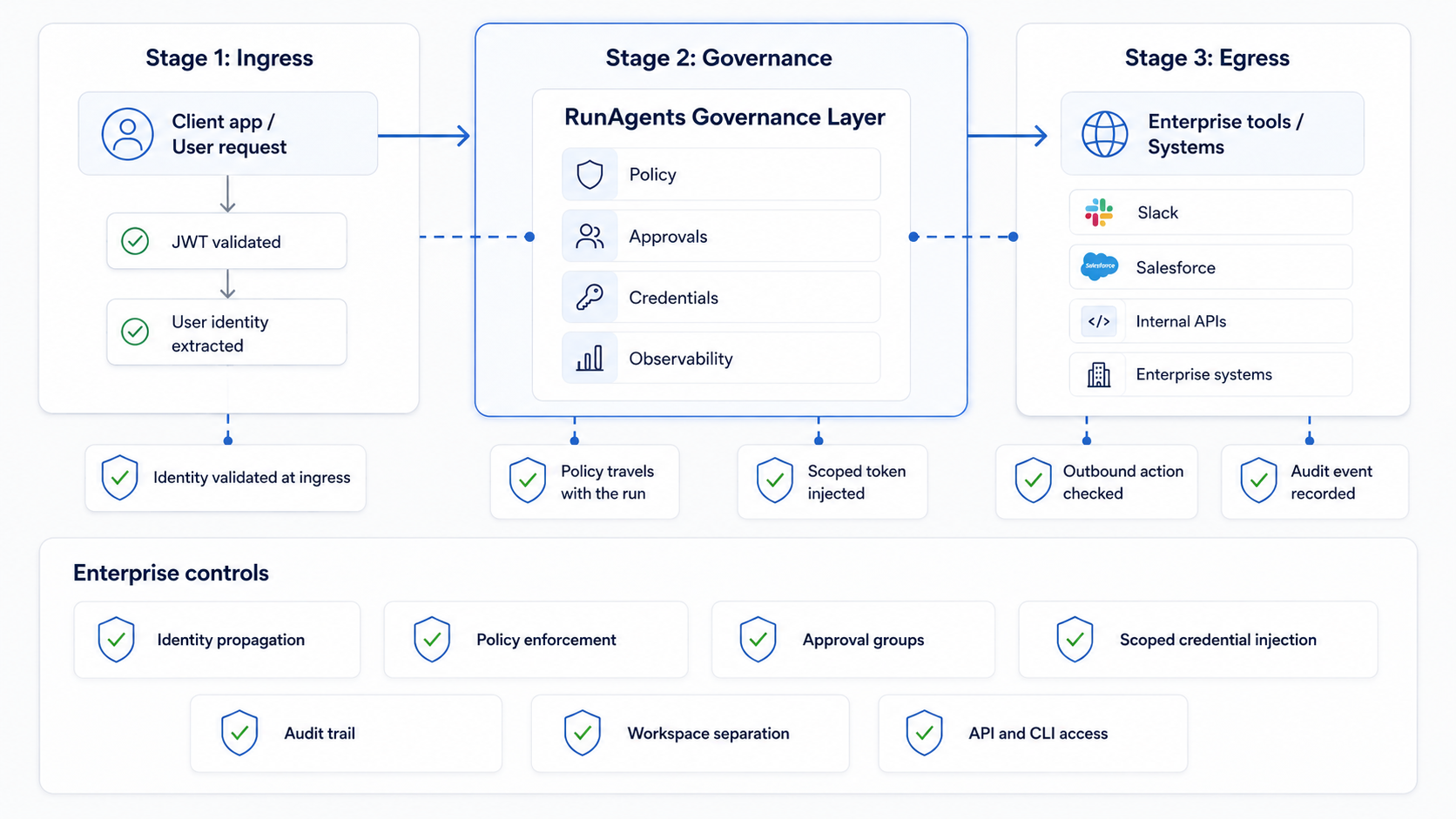
Every tool call moves through ingress, runtime, and egress before it reaches a production system.
-
Stage 1 · Ingress
JWT validated at the edge. User identity extracted and forwarded as
X-End-User-IDheader through the entire call chain. -
Stage 2 · Runtime
Agent executes — LLM calls route through the gateway, tool calls route through the policy engine. Logs structured events per turn.
-
Stage 3 · Egress
Every outbound call intercepted: identity verified, policy evaluated, OAuth token injected. Approval workflows triggered on deny.
Read the full architecture guide
Core concepts
Identity, policy, approvals, and credentials stay on the same path
The user who triggered the agent is identified at ingress. That identity travels — unchanged — to every tool the agent calls.
- JWT validated and unpacked at the platform edge
X-End-User-IDheader forwarded automatically to all downstream tools- External APIs see the real end-user, not a shared service account
- Full traceability: every tool call is linked to a real human identity
Agents can only call tools they have been explicitly granted access to. Policies enforce not just which tools, but which operations.
- Policies define URL/tag rules with
allow,deny, orapproval_required - Capability checks enforce method + path level (
POST /chargesvsGET /customers) - Default posture is deny unless a bound policy explicitly allows access
- Approval workflows are triggered by policy rules, not by legacy tool flags
High-risk operations pause the agent. An admin reviews the exact payload, approves or rejects, and the platform auto-resumes.
- Payload hash verification — the approved request must match exactly what the agent sends
- Notification via Slack (with OIDC identity linking), PagerDuty, Teams, or Jira
- Time-limited grants — access expires after a configurable TTL
- Full resume automation — no manual re-triggering after approval
Build agents
Start from the CLI or bring your existing code
Use the terminal when you want the fastest path to a governed deployment, or bring existing agents in through the builder workflows.
# Install
curl -fsSL https://runagents-releases.s3.amazonaws.com/cli/install.sh | sh

# Configure
runagents config set endpoint https://your-workspace.try.runagents.io/api/v1
runagents config set api-key YOUR_API_KEY

# Deploy with natural language
runagents copilot
> deploy this folder as billing-agent

  Analyzing source files...
  ✓ Detected: stripe tool, gpt-4o-mini model
  ✓ Tool registered: stripe
  ✓ Agent deployed: billing-agent (Running)
What’s new
Recent releases across the platform, CLI, SDK, and MCP surface.
RunAgents v1.4.1 · RunAgents v1.4.0 · RunAgents v1.3.1 · SDK & MCP v1.3.0 · All release notes
Ready to deploy your first agent?
Free trial. No credit card. Running in 5 minutes.